
How to make an AI Christmas photo from your own photo
This page runs the NanoPic AI background changer with a Christmas prompt already loaded. Upload the photo, keep or edit the setting, and generate. Your words are sent to Google’s Nano Banana 2 model together with a fixed instruction to keep the people, their faces, clothes and pose the same and only replace what is behind them. The result is one 2K image.
Upload one photo with everyone in it
Use a JPG, PNG or WebP up to 10 MB in which every person is already in the frame. The tool changes the background of one photo; it cannot combine people from separate photos.
Describe the Christmas setting
The Christmas living room prompt is filled in. Change the room, add snow outside, or name the decorations you want, and keep the line about keeping everyone the same.
Sign in, generate and download
Each image costs 10 credits. Our one test run was ready in 51 seconds; times vary. Check faces, hands and anything people were holding, then download; results are kept for 30 days.
What our AI Christmas photo test showed
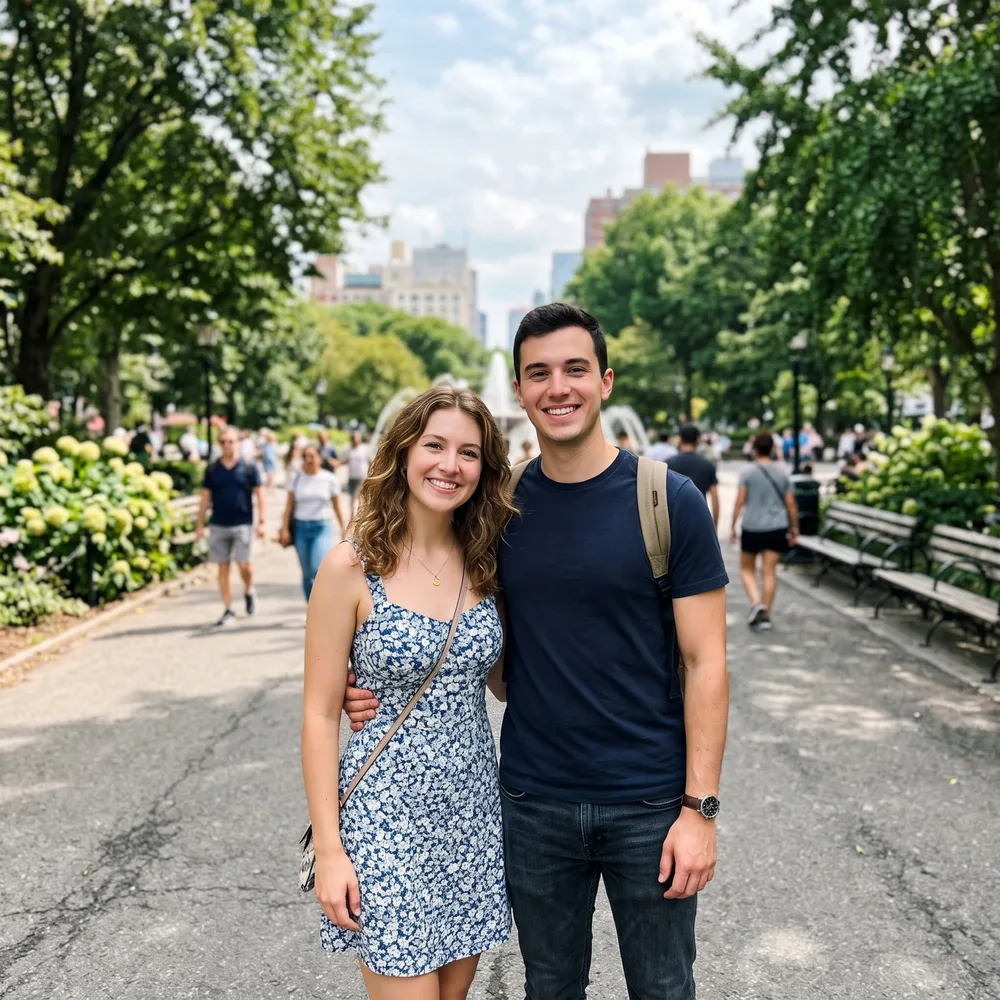
We ran the prompt once on the live site on November 13, 2026. The input was a 1600 × 1600 daytime photo of a couple in a city park that NanoPic itself generated from a text prompt for testing; it is not a customer photo. The result came back in 51 seconds at 2048 × 2048 and cost 10 credits.
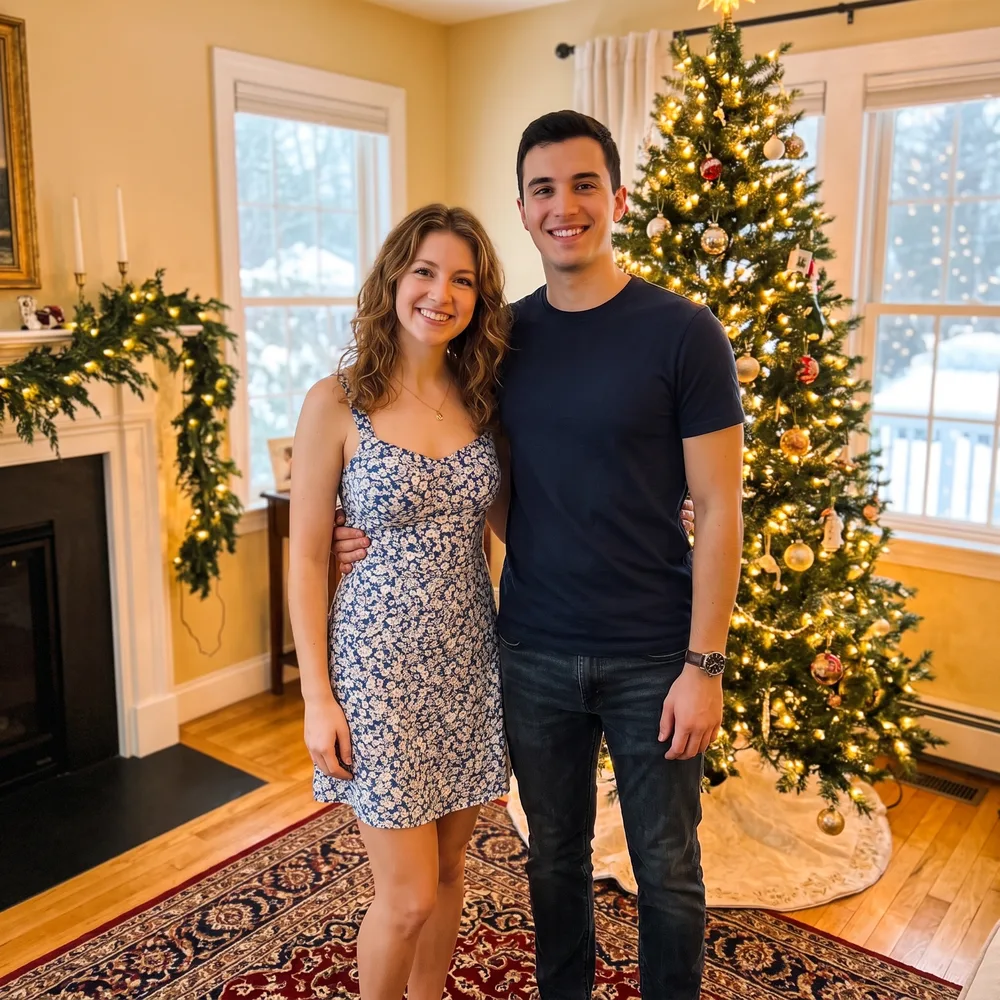
In our visual check both faces, the floral dress, the navy T-shirt, the jeans, the necklace and the watch carried over, and the park became a living room with a lit tree, a garland on the fireplace and snow outside the windows. It was not a pure background swap, though: the woman’s shoulder bag and the man’s backpack straps disappeared, the framing widened to show the couple down to the knees, and the placement of his arm around her waist shifted slightly. Compare the result with your photo before you send it.
| What we checked | Result in our test |
|---|---|
| Faces | Both people kept and recognizable |
| Clothes and jewellery | Dress, T-shirt, jeans, necklace and watch kept |
| Things being carried | Shoulder bag and backpack straps removed by the model |
| Framing and pose | Wider frame, down to the knees; arm position changed slightly |
| New background | Living room with a lit tree, fireplace garland, rug and snow outside |
| Time and size | 51 seconds, 2048 × 2048 pixels |
Christmas photo backgrounds and prompt ideas
Describe one setting in plain words: the place, the light and two or three decorations. The buttons under the prompt box load the cabin, market and red backdrop prompts, and the living room prompt is already filled in; copy the fireplace wording yourself. We have run only the living room prompt, so treat these as untested starting points.
| Setting | Wording to use |
|---|---|
| Living room | a cozy living room decorated for Christmas, with a lit Christmas tree and warm string lights (tested) |
| Snowy outdoors | the porch of a snowy log cabin at dusk, with a wreath on the door |
| Christmas market | an outdoor Christmas market at night, with wooden stalls and string lights |
| Card backdrop | a plain deep red studio backdrop with soft out-of-focus lights and empty space at the top |
| By the fireplace | a stone fireplace with stockings hanging from the mantel and candles |
Family, couple and pet Christmas photos
The tool works on one photo at a time, so everyone has to be in the photo you upload. Our test used two people. For a larger group, start from a photo where every face is sharp and not covered; the more people, the more faces the model has to keep. We have not tested groups larger than two or a pet photo with this prompt yet. For a pet, change “both people” to “the dog” or “the cat” in the prompt.
- Everyone in one photo: separate photos cannot be merged into one.
- Faces large enough to see clearly; small faces in a wide group shot give the model less to keep.
- Only upload photos of people who agreed to it, and take extra care with photos of children.
Christmas outfits, sweaters and Santa hats
This page asks the model to replace only the background and keep clothes the same, so it will not reliably add a Christmas sweater or a Santa hat. To change what people wear, run the photo through the AI outfit changer as a second step, for example “a red knitted Christmas sweater with white snowflakes”. Each step costs 10 credits.
AI Christmas photo for cards and social posts
Our test result was a square 2048 × 2048 image; the tool asks for 2K output, and the shape can differ with your photo. You can download it and print it as a Christmas card or photo, post it, or use it as a profile picture. NanoPic does not add greeting text or card layouts; put your message on it in a card or photo-printing service. If you plan to add text, use the card backdrop idea above, which asks for empty space at the top. This page edits still photos only: it has no avatar style picker and does not make video.
- A Christmas card photo when you never got a holiday shoot.
- A festive profile picture or social post.
- A product photo with a Christmas background, using a product shot instead of people.
Make a Christmas picture from text only
Without a photo, use the NanoPic AI image editor and switch to the “Create an image” tab, then describe the whole Christmas scene. The people in it will be invented by the model, not based on anyone real. We have not run a Christmas text-only test yet, so we cannot show a result here.
AI Christmas photo price and privacy
Each Christmas photo costs 10 credits. Pro is $16.90 a month for 200 credits, or $144 a year for 2,400 credits. Our calculation: 200 ÷ 10 = 20 images a month if you spend all the credits on images. There is no free plan and no free credits. Prices as of November 13, 2026.
You must sign in to generate. NanoPic runs automated safety checks, including NSFW screening: your text prompt first and the uploaded photo second, both before it charges anything, and the finished image last. If the finished image is blocked or the generation fails, the credits are normally returned to your account automatically; if they do not appear, contact support. Results are listed in your account history, not in a public gallery. Each result has an unlisted direct link that anyone with the exact link can open. Result files are scheduled for deletion from our storage after 30 days.