

AI Outfit ChangerChange the clothes in a photo, keep the person.

Sign in to generate · 10 credits per image

The NanoPic AI outfit changer changes clothes on the same person in an uploaded photo. Describe the garments you want, then sign in to generate a 2K outfit edit.

01Upload your image
or drag and dropJPG, PNG, WebP · up to 10 MB · 256–4096 px per side
020/1000

An account is needed to generate. Each image costs 10 credits.

Model: Nano Banana 2 · via KIE · 2K output

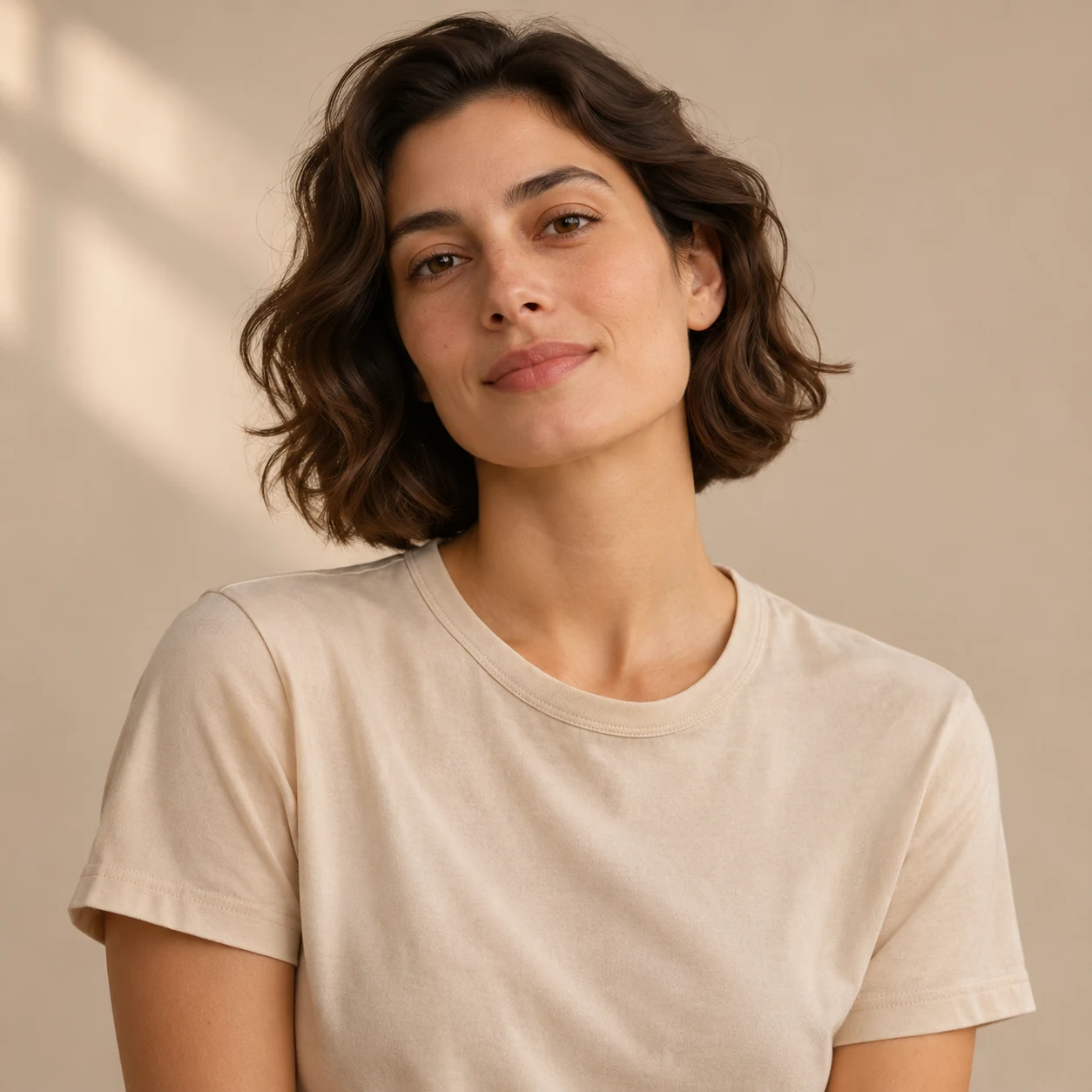
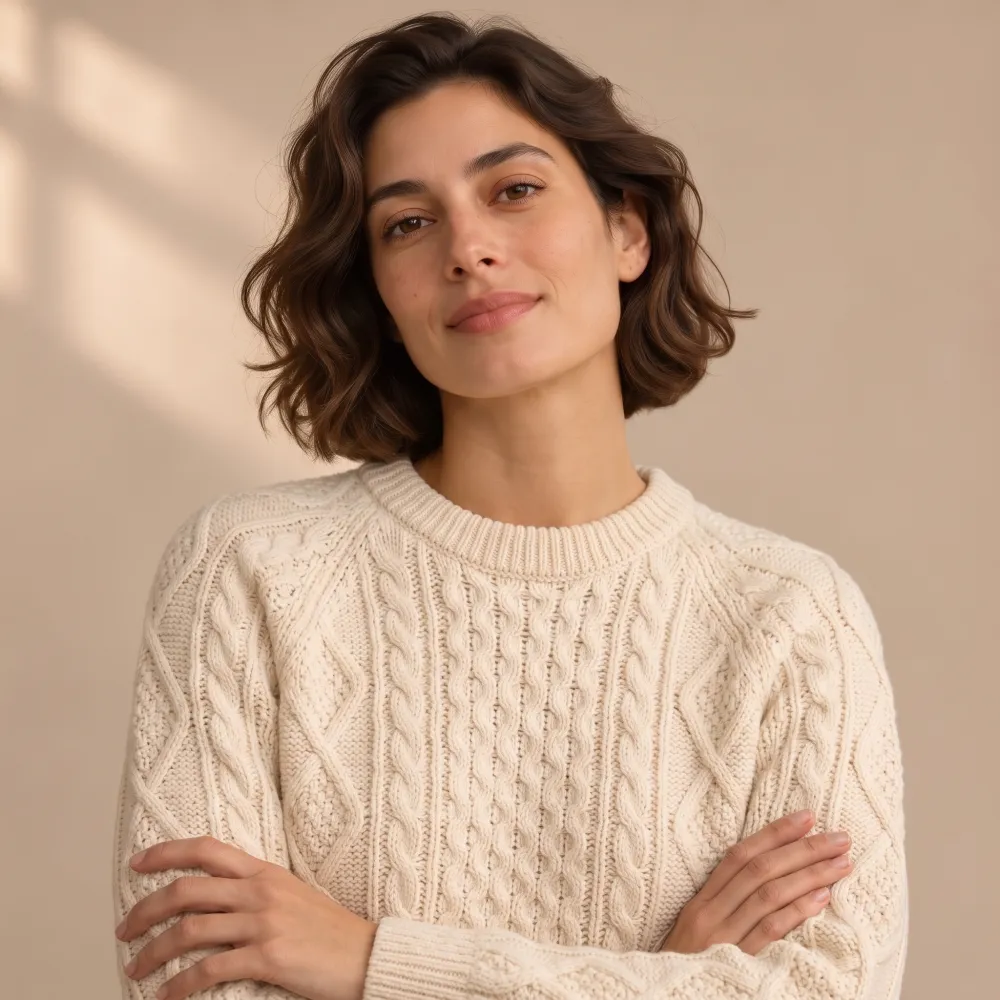
Real result: T-shirt changed to a cream knit sweater

REAL RESULT
BeforeInput: portrait wearing a casual T-shirt
AfterNanoPic result: the same person wearing a cream cable-knit sweater

“Change only the top to a cream cable-knit sweater. Keep the same person, face, hair, pose and background.” Made on nanopic.org on Nov 13, 2026: 37 seconds, 2048 × 2048 output, first attempt, not retouched. The model also changed the pose (arms crossed).

Real NanoPic result · first attempt, not retouched

  1. Choose a photo of the person
  2. Write the clothing description
  3. Review the outfit image

AI outfit changer example: real before and after

We ran these on the live site on with Nano Banana 2 (through the KIE API). Each is the first and only attempt, not retouched. The input photos are AI concept images from our own design set or images we generated with NanoPic for the test (prepared as noted on each card), not customer photos.

Change only the top: T-shirt to cream cable-knit sweater

Input photo for: Change only the top: T-shirt to cream cable-knit sweater
Input · 1254 × 1254
NanoPic result: Change only the top: T-shirt to cream cable-knit sweater
Result · 2048 × 2048

“Change only the top to a cream cable-knit sweater. Keep the same person, face, hair, pose and background.”

Time
37 seconds from start to finished (one run, status checked every 4 seconds)
Cost
10 credits
Result
2048 × 2048 JPEG (shown here resized)

Face, hair and the window-light backdrop stayed. The sweater has a believable cable pattern, but the model also crossed her arms and straightened her head, so the pose was not kept exactly.

Outfit prompts to try

Browse all prompts
Concept picture: a smart-casual jacket swap. AI concept illustrationInput photoConcept image

Outfits

Charcoal blazer

Change the outfit to a tailored charcoal blazer. Keep the same person, hairstyle and pose.

Fills the editor above

Real NanoPic result: Cream knit sweaterInput photoReal result

Outfits

Cream knit sweater

Change only the top to a cream cable-knit sweater. Keep the same person, face, hair, pose and background.

Fills the editor above

Outfits

Navy midi dress

Change the clothes to a simple navy midi dress with short sleeves. Keep the same person, hairstyle, pose and lighting.

Fills the editor above

Your result depends on your photo and wording. Pictures marked “Concept image” are AI illustrations, not NanoPic outputs.

How to use the AI outfit changer

Upload a photo and tell the tool which clothes to change. Keep your request about garments: the outfit changer keeps the same person and only changes clothing.

  1. Choose a photo of the person

    Upload a supported photo where the clothing you want to change is visible.

  2. Write the clothing description

    Specify garments, colors, and materials. The edit keeps the same person and changes only clothes. Sign in to generate for 10 credits.

  3. Review the outfit image

    Look over the generated clothes in the 2K output. Download the image before the 30-day retention period ends.

AI outfit changer uses for clothing ideas

Explore how a described clothing combination could look in a photo. Use the result as a visual idea for a work outfit, a casual combination, or a different color palette.

  • Try a blazer and shirt combination.
  • Explore a knitwear color with jeans.
  • Compare an outfit idea with the clothing in your original photo.

AI outfit changer tips for describing clothes

Name each garment separately and include its color or material. Choose a source photo that shows the relevant clothing area clearly.

Clothing detailPrompt example
Garment and colorA navy blazer over a white shirt
MaterialA cream cable-knit sweater
Complete combinationOlive cotton jacket with beige trousers

AI outfit changer photo limits and output size

The source must be a JPG, PNG, or WebP file of up to 10 MB. Each side must be 256–4096 px. Outfit edits are generated at 2K resolution.

AI outfit changer credit cost and plans

Generating an outfit image uses 10 credits. Pro costs $16.90 monthly for 200 credits, or about 20 images. The yearly price is $144, and there is no free plan or free credit offer. Prices as of November 13, 2026.

AI outfit changer privacy and safety review

Outfit results are listed only in your signed-in account, never publicly. Each result has an unlisted direct link that anyone holding the exact link can open. Results are scheduled for deletion from our storage after 30 days; download any image you want to keep.

The tool runs on Google's Nano Banana 2 image model via the KIE API. Safety review follows this order: clothing prompt, uploaded photo, generated result. Blocked jobs are not charged, and failed generation credits are returned automatically.

On desktop, you can scan a QR code to transfer your photo from a phone. The code expires after 15 minutes. We request deletion of the transfer copy after pickup; scheduled cleanup also removes leftover copies.

Other AI image tools

AI Outfit Changer FAQ

Does the outfit changer keep the same person?

Yes. This tool keeps the same person and only changes clothes.

Can I describe colors and fabrics?

Yes. Include the garment, color, and material in your prompt, such as a blue linen shirt.

What kind of photo should I upload?

Choose a supported photo that clearly shows the clothing area you want to change.

How many outfit images do 200 credits cover?

At 10 credits per generated image, 200 credits cover about 20 images.

Are my generated outfit photos public?

Results are listed in your account, not in a public gallery. Each result has an unlisted direct link that anyone with the exact link can open, so share it with care. Results are stored for 30 days and then scheduled for deletion from our storage.