
AI Image EditorEdit photos with words.

Sign in to generate · 10 credits per image

Use the NanoPic AI image editor to change a photo with written instructions or generate an image from text alone. Upload a photo if you have one, describe the result, and sign in to generate.

01Upload the image to edit
or drag and dropJPG, PNG, WebP · up to 10 MB · 256–4096 px per side
020/1000

An account is needed to generate. Each image costs 10 credits.

Model: Nano Banana 2 · via KIE · 2K output

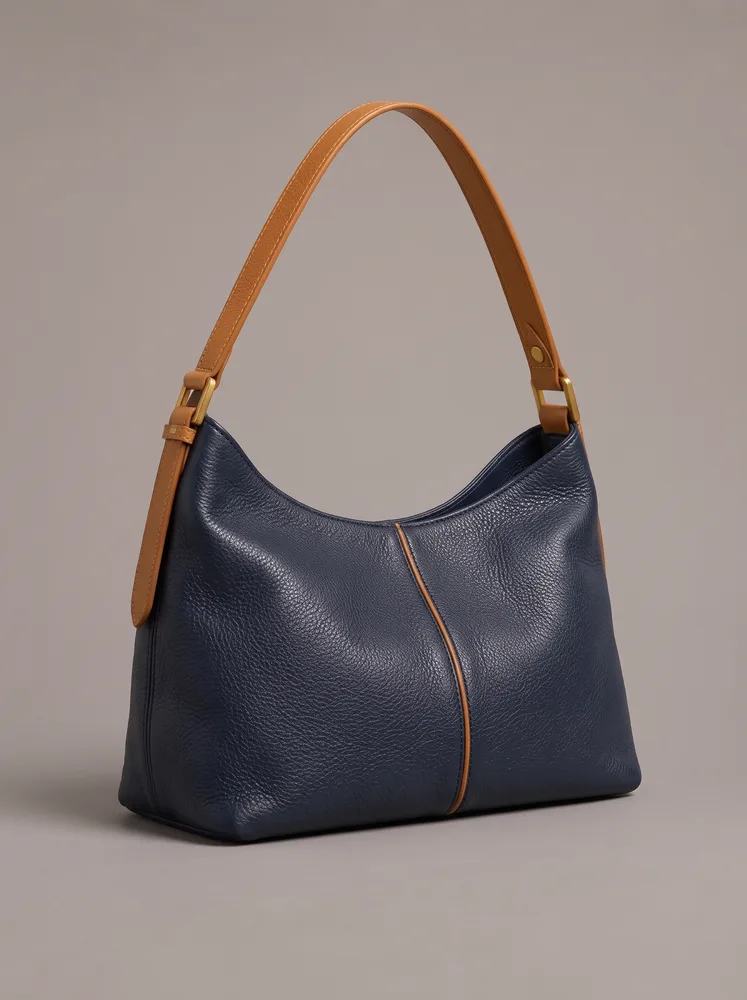
Real result: handbag recolored to navy

REAL RESULT
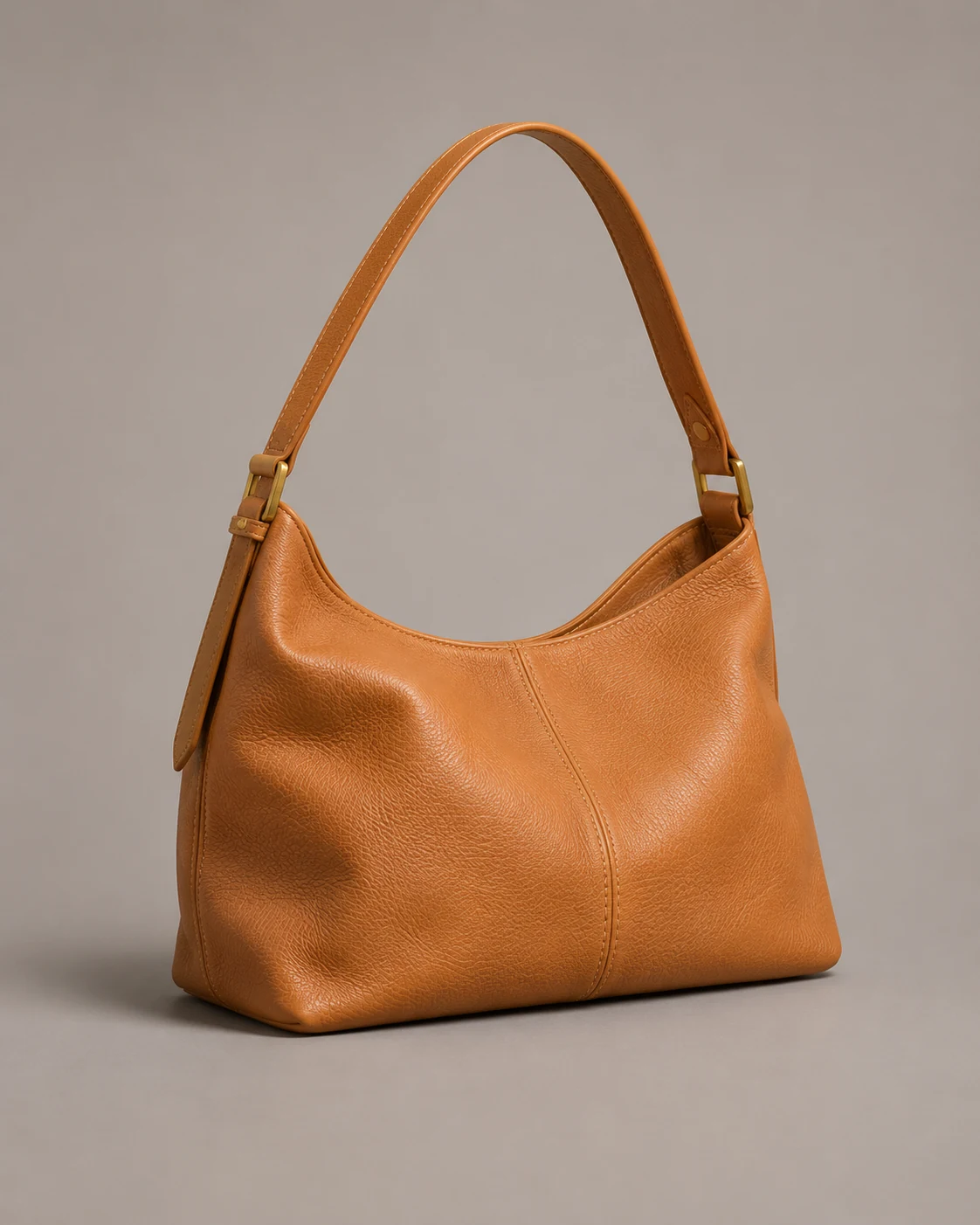
BeforeInput: tan shoulder bag against a plain gray background
AfterNanoPic result: the same bag in matte navy leather

“Change the handbag leather to matte navy blue. Keep the strap, buckles, shape, background and lighting the same.” Made on nanopic.org on Nov 13, 2026: 42 seconds, 1792 × 2400 output, first attempt, not retouched.

Real NanoPic result · first attempt, not retouched

  1. Start with a photo or text
  2. Write a specific instruction
  3. Generate and download

AI image editor examples: real results with prompts

We ran these on the live site on with Nano Banana 2 (through the KIE API). Each is the first and only attempt, not retouched. The input photos are AI concept images from our own design set or images we generated with NanoPic for the test (prepared as noted on each card), not customer photos.

Recolor a product: tan handbag to matte navy

Input photo for: Recolor a product: tan handbag to matte navy
Input · 1122 × 1402
NanoPic result: Recolor a product: tan handbag to matte navy
Result · 1792 × 2400

“Change the handbag leather to matte navy blue. Keep the strap, buckles, shape, background and lighting the same.”

Time
42 seconds from start to finished (one run, status checked every 4 seconds)
Cost
10 credits
Result
1792 × 2400 JPEG (shown here resized)

The body turned navy while the tan strap, piping and brass buckles stayed. The grain texture was redrawn, not copied pixel for pixel.

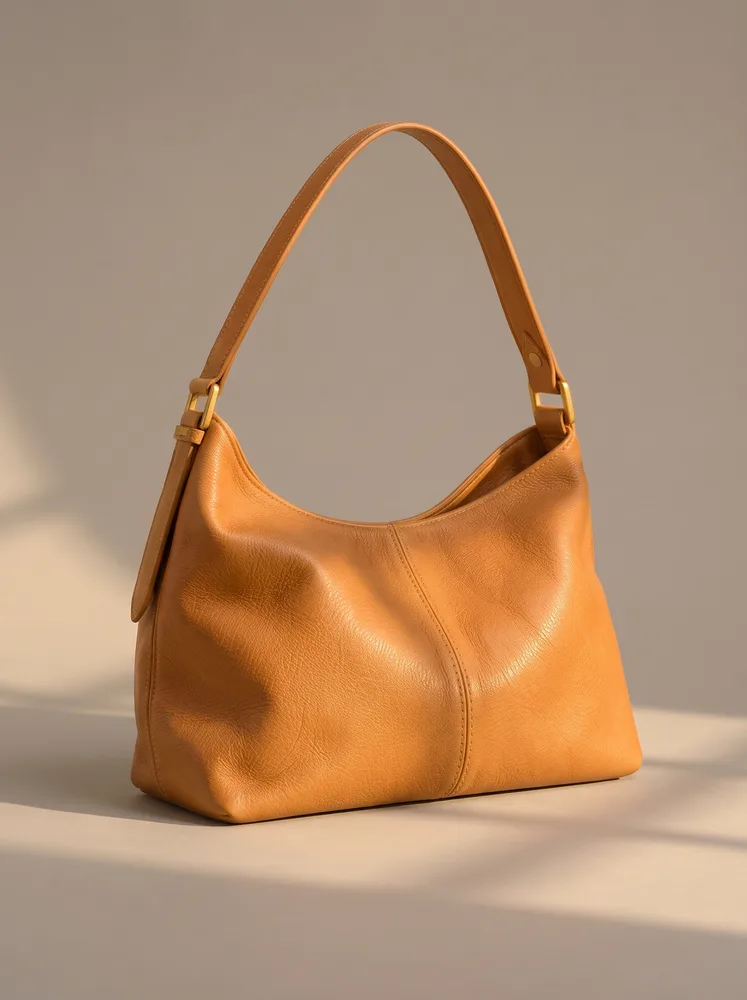
Relight a photo: warm afternoon light

Input photo for: Relight a photo: warm afternoon light
Input · 1122 × 1402
NanoPic result: Relight a photo: warm afternoon light
Result · 1792 × 2400

“Give this photo soft warm afternoon light with natural shadows. Preserve the subject, composition and colors.”

Time
43 seconds from start to finished (one run, status checked every 4 seconds)
Cost
10 credits
Result
1792 × 2400 JPEG (shown here resized)

Window-light shadows were added to the wall and floor. The bag kept its shape and tan color, with slightly lighter, glossier leather.

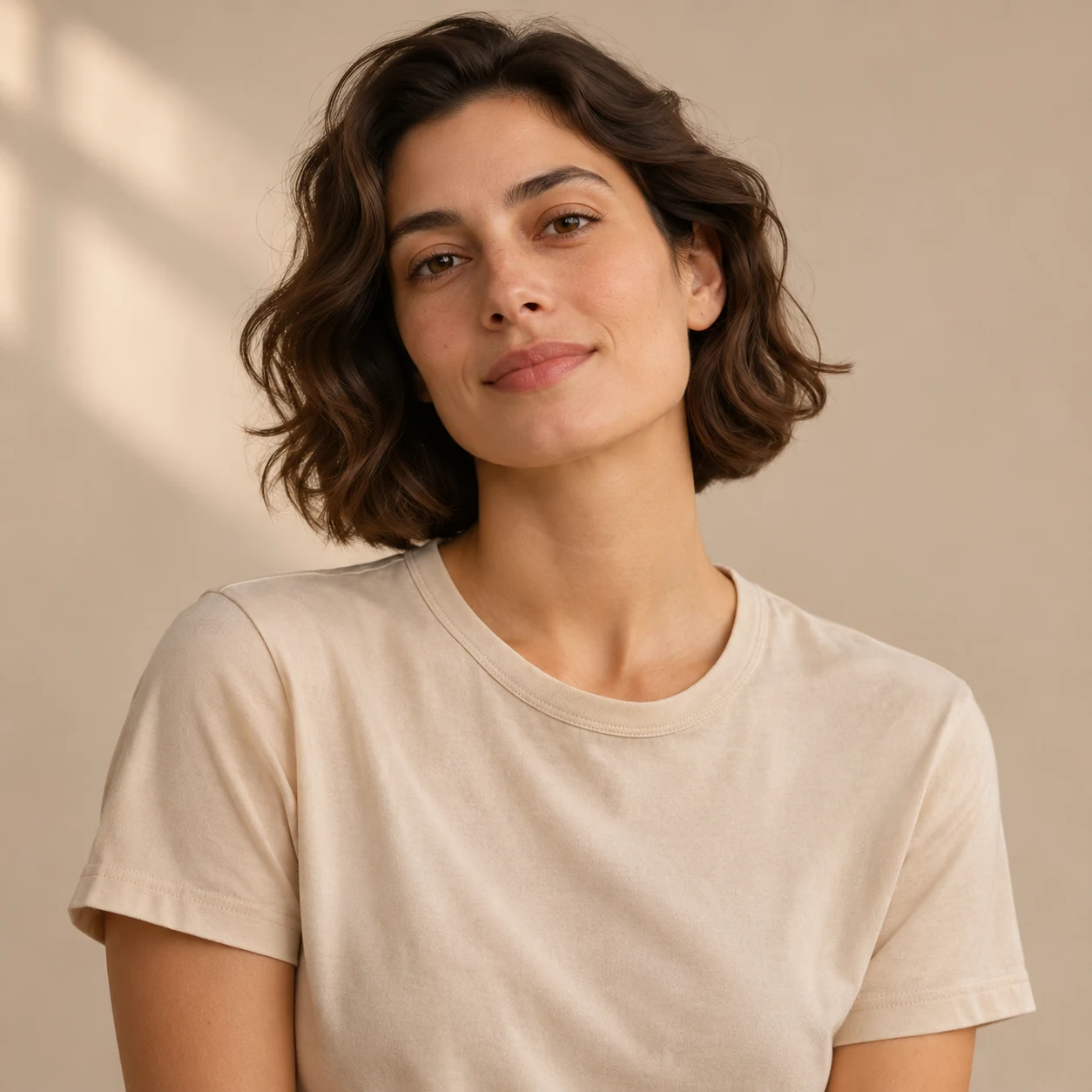
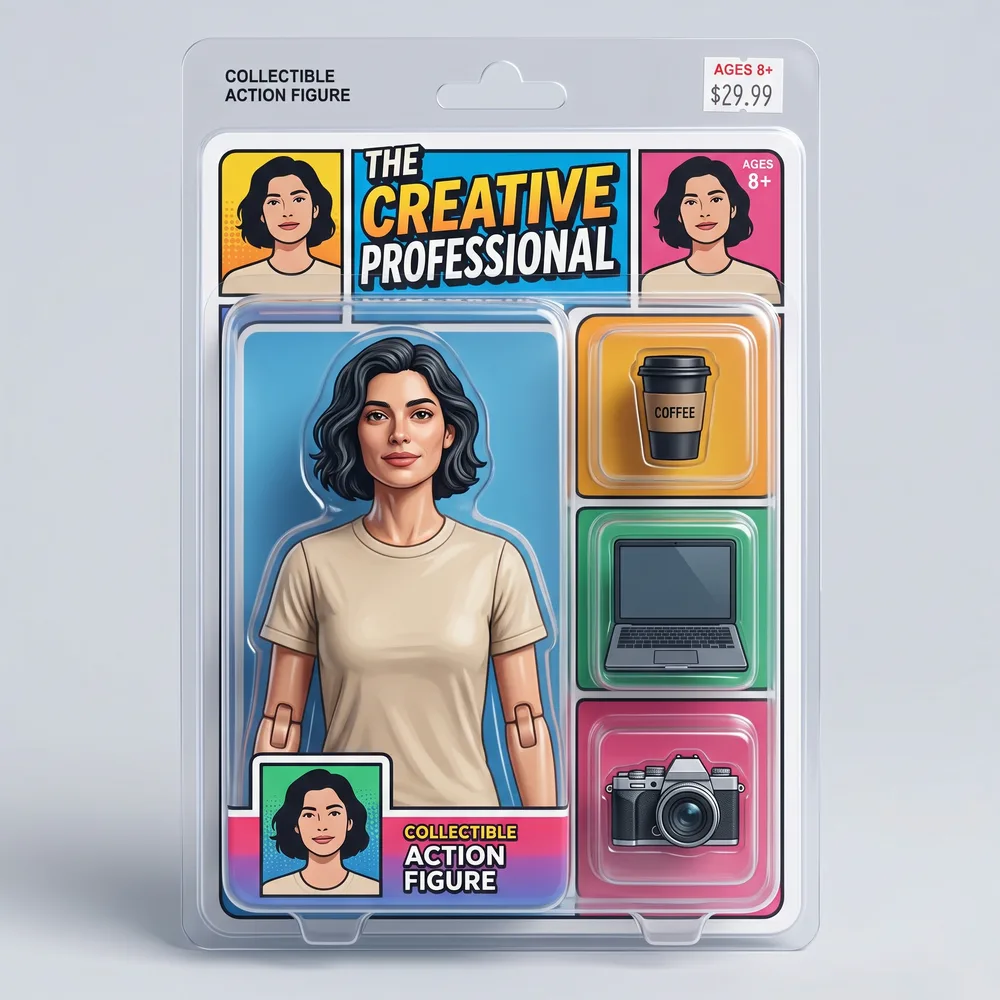
Action figure in a blister pack from one portrait

Input photo for: Action figure in a blister pack from one portrait
Input · 1254 × 1254
NanoPic result: Action figure in a blister pack from one portrait
Result · 2048 × 2048

“Turn this person into a collectible action figure sealed in a blister pack: the figure inside a clear plastic bubble on a printed cardboard backing card, with small accessories (a coffee cup, a laptop, a camera) in their own plastic slots. Toy-store product photo. Keep the face recognizable.”

Time
62 seconds from start to finished (one run, status checked every 4 seconds)
Cost
10 credits
Result
2048 × 2048 JPEG (shown here resized)

The figure resembles the photo and kept the beige T-shirt; the face was smoothed into a toy style and the brown hair came out close to black. The coffee cup, laptop and camera each got their own slot. The model also wrote its own packaging text ("The Creative Professional", "Ages 8+", a $29.99 price tag), so expect invented words on the card.

AI image editor prompts to try

Browse all prompts
Real NanoPic result: Recolor a productInput photoReal result

Products

Recolor a product

Change the handbag leather to matte navy blue. Keep the strap, buckles, shape, background and lighting the same.

Fills the editor above

Real NanoPic result: Warm afternoon lightInput photoReal result

Lighting

Warm afternoon light

Give this photo soft warm afternoon light with natural shadows. Preserve the subject, composition and colors.

Fills the editor above

Real NanoPic result: Action figure in a blister packInput photoReal result

Figurines

Action figure in a blister pack

Turn this person into a collectible action figure sealed in a blister pack: the figure inside a clear plastic bubble on a printed cardboard backing card, with small accessories (a coffee cup, a laptop, a camera) in their own plastic slots. Toy-store product photo. Keep the face recognizable.

Fills the editor above

Your result depends on your photo and wording.

How to use the AI image editor

Choose whether to edit an existing photo or start from a written idea. For a photo edit, describe the change in relation to what is already in the picture; for text to image, describe the whole scene.

  1. Start with a photo or text

    Upload a JPG, PNG, or WebP to edit, or leave the photo empty to create an image from a description.

  2. Write a specific instruction

    Name the subject, the change you want, and any details you want to keep. Sign in before generating.

  3. Generate and download

    Generate a 2K image for 10 credits. Review the result and download the file within the 30-day storage period.

AI image editing uses: objects, lighting, and illustration

Use a prompt to request a different object color, a new lighting mood, or an illustrated treatment of a photo. Text to image is useful when you have an idea but no starting photo.

  • Request a color change for an object in a photo.
  • Describe a scene, subject, and composition for a new image.
  • Ask for an illustration style and name the details that should remain recognizable.

Prompt tips for the AI image editor

Start with one clear goal. State what should stay the same as well as what should change; these instructions guide the model but do not guarantee an exact match.

What to typeRequested result
Make the handbag navy; keep the strap and backgroundAn object color edit
Use soft morning light from the leftA specific lighting direction
Create a pencil drawing of a cabin by a lakeA new image from text alone

AI image editor file limits and output resolution

Photo inputs must be JPG, PNG, or WebP, up to 10 MB, with each side between 256 and 4096 px. The editor generates at 2K resolution.

AI image editor pricing and credits

Each generated edit or text-to-image result costs 10 credits. Pro is $16.90 per month for 200 credits, about 20 images; the yearly price is $144. There is no free plan or free credit allowance. Prices as of November 13, 2026.

AI image editor privacy, safety, and storage

Sign-in is required. Results are listed only in your account, never publicly. Each result has an unlisted direct link that anyone holding the exact link can open, so share it with care. Results are scheduled for deletion from our storage after 30 days, so download any files you want to keep.

The model behind the editor is Google's Nano Banana 2, accessed through the KIE API. Safety checks run on the text prompt first, the uploaded photo next when present, and the result last. Blocked jobs are not charged; failed jobs receive automatic credit refunds.

On a desktop, scan the QR code to send a photo from your phone. The code expires after 15 minutes. We request deletion of the transfer copy after pickup; scheduled cleanup also removes leftover copies.

More AI image tools

AI Image Editor FAQ

Can I generate an image without uploading a photo?

Yes. Leave the photo empty and describe what you want to create in the prompt.

What should I write to edit just one detail?

Name the detail to change and describe what should stay the same. Check the generated image before using it.

Do I need an account to use the editor?

You must sign in to generate. Results are listed in your account, not in a public gallery. Each result has an unlisted direct link that anyone with the exact link can open.

Will a failed edit use my credits?

Failed jobs are refunded automatically, and blocked jobs are not charged.

How long can I download my edited image?

Results are scheduled for deletion from our storage after 30 days. Download the file during that period.