
How to make a Happy Diwali AI photo from your own photo
This page runs the NanoPic AI background changer with a Diwali prompt already loaded. Upload the photo, keep or edit the setting, and generate. Your words are sent to Google’s Nano Banana 2 model together with a fixed instruction to keep the people, their faces, clothes and pose the same and only replace what is behind them. The result is one 2K image. It works the same for any Diwali: nothing on the page is tied to one year’s date.
Upload one photo with everyone in it
Use a JPG, PNG or WebP up to 10 MB in which every person is already in the frame. The tool changes the setting of one photo; it cannot combine people from separate photos.
Describe the Diwali setting
The diya-lit balcony prompt is filled in. Change the place, the decorations or the sky, and keep the line about keeping everyone the same.
Sign in, generate and download
Each image costs 10 credits. Our one test run was ready in about a minute; times vary. Check faces, hands and anything people were holding, then download; results are kept for 30 days.
What our Diwali AI photo test showed
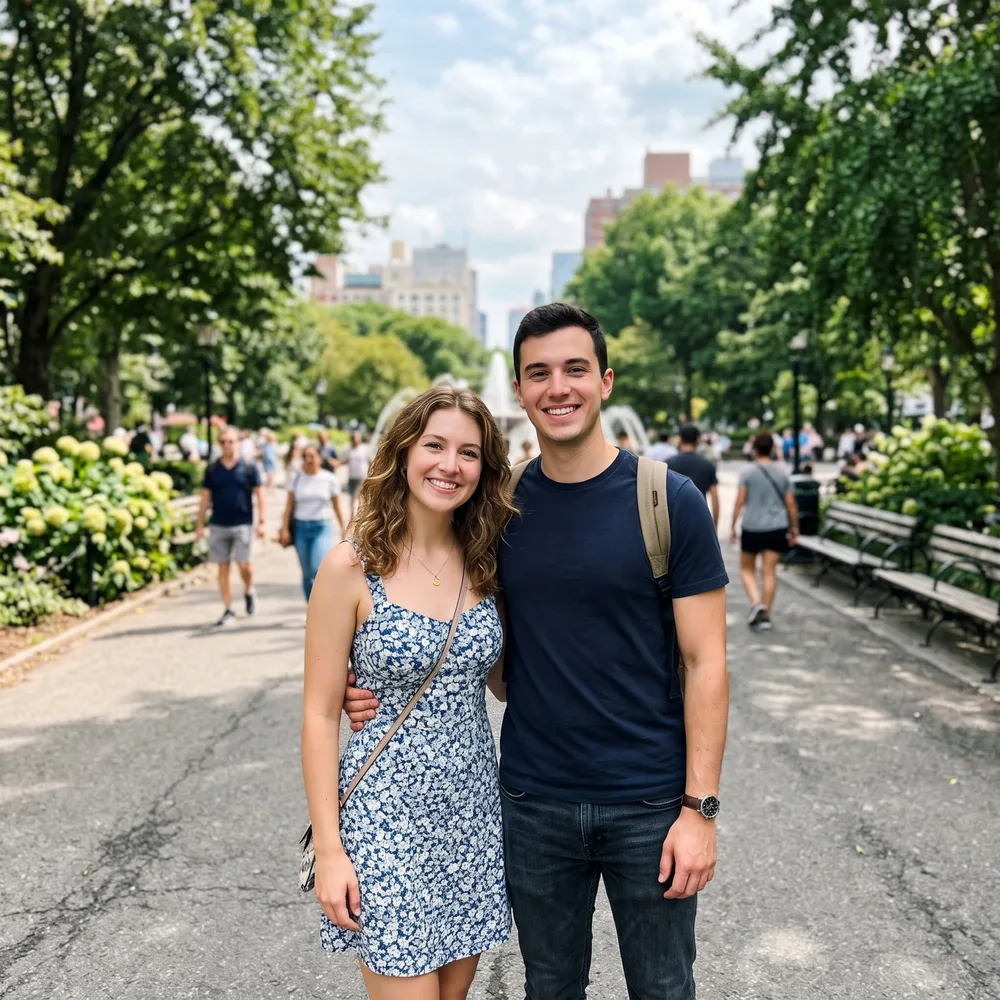
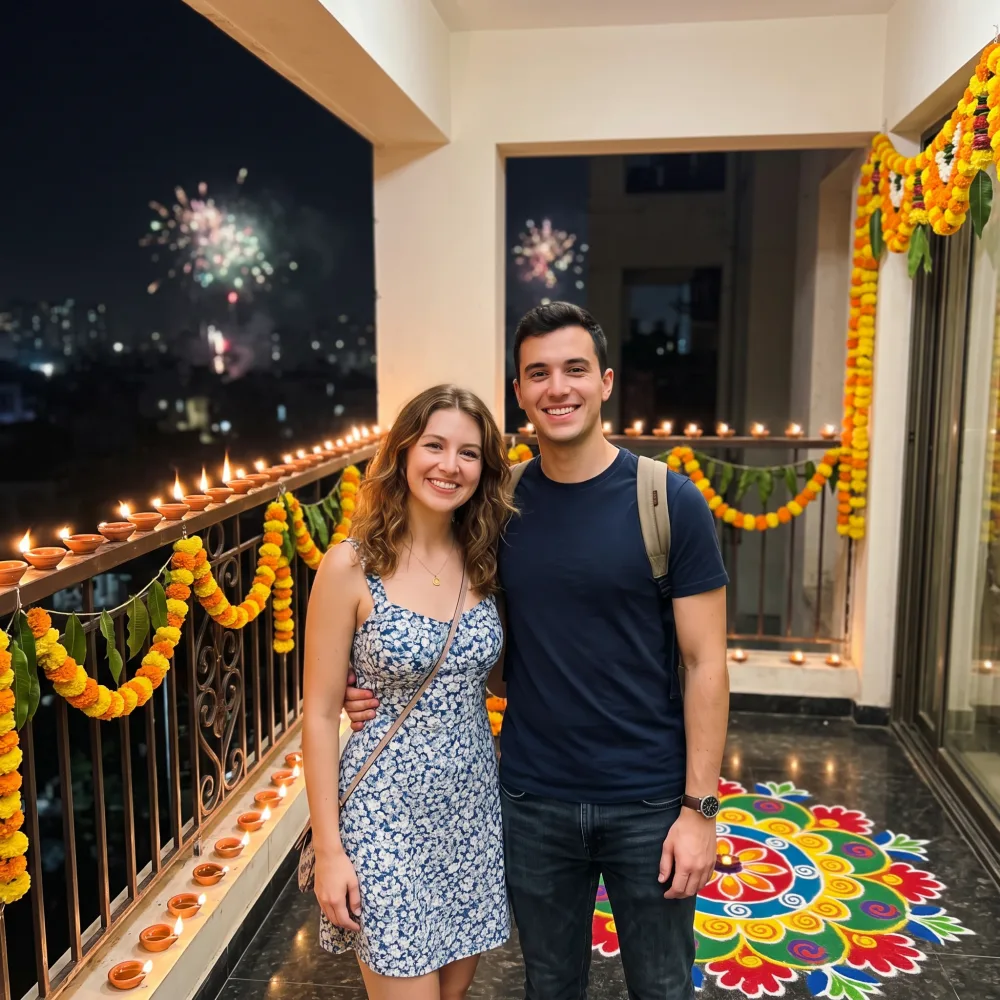
We ran the balcony prompt once on the live site on November 20, 2026. The input was a 1000 × 1000 daytime photo of a couple in a city park that NanoPic itself generated from a text prompt for an earlier test; it is not a customer photo. The result came back in about a minute (62 seconds or less, measured by polling) at 2048 × 2048 and cost 10 credits.
In our visual check both faces, the floral dress, the navy T-shirt, the jeans, the shoulder bag, the backpack straps, the necklace and the watch carried over. The park became a balcony at night with clay diyas along the railing, marigold garlands, a rangoli on the floor and fireworks over the city. The model also relit the couple with warm evening light so they match the scene, and cropped the frame slightly tighter. Compare the result with your photo before you send it.
| What we checked | Result in our test |
|---|---|
| Faces | Both people kept and recognizable |
| Clothes and accessories | Dress, T-shirt, jeans, necklace and watch kept |
| Things being carried | Shoulder bag and backpack straps kept |
| Light on the people | Changed from daylight to warm night light to match the scene |
| Framing and pose | Pose kept; frame slightly tighter |
| New setting | Night balcony with diyas, marigold garlands, rangoli and fireworks |
| Time and size | About a minute, 2048 × 2048 pixels |
Diwali photo ideas: diyas, rangoli, lanterns and fireworks
Describe one setting in plain words: the place, the light and two or three Diwali details. The buttons under the prompt box load the doorway, street and maroon card backdrop prompts, and the balcony prompt is already filled in. We have run only the balcony prompt, so treat the others as untested starting points.
| Setting | Wording to use |
|---|---|
| Balcony at night | a balcony at night with rows of lit clay diyas along the railing, a rangoli, marigold garlands and fireworks (tested) |
| Home doorway | the front doorway of a home on Diwali night, with a rangoli, diyas on the steps and a marigold toran |
| Festive street | a festive street on Diwali night, with paper lanterns, strings of lights and fireworks |
| Card backdrop | a plain deep maroon backdrop with soft out-of-focus diya lights and empty space at the top |
| Puja corner | a home puja corner with brass lamps, flowers and a small rangoli, in warm candle light |
Diwali family and couple photos
The tool works on one photo at a time, so everyone has to be in the photo you upload. Our test used two people. For a larger family, start from a photo where every face is sharp and not covered; the more people, the more faces the model has to keep. We have not tested groups larger than two with this prompt yet. For a solo picture, change “both people” to “this person” in the prompt.
- Everyone in one photo: separate photos cannot be merged into one.
- Faces large enough to see clearly; small faces in a wide group shot give the model less to keep.
- Only upload photos of people who agreed to it, and take extra care with photos of children.
Traditional Diwali outfits: saree, kurta and lehenga
This page asks the model to change only the setting and keep clothes the same, so it will not reliably dress anyone in a saree or kurta. To change what people wear, run the photo through the AI outfit changer as a second step, for example “a deep red silk saree with a gold border” or “a cream silk kurta with a maroon dupatta”. Each step costs 10 credits. We have not tested these outfit wordings yet.
Happy Diwali AI photo for wishes, cards and status
Our test result was a square 2048 × 2048 image; the tool asks for 2K output, and the shape can differ with your photo. You can download it and send it with your Diwali wishes, post it as a WhatsApp or Instagram status, or print it for a card. NanoPic does not add “Happy Diwali” text or card layouts; put your message on it in a card or photo-editing app. If you plan to add text, use the maroon card backdrop idea above, which asks for empty space at the top. This page edits still photos only and does not make video.
- A festive picture to send with Diwali wishes to family and friends.
- A status or profile picture for the festival week.
- A product photo with a Diwali setting, using a product shot instead of people.
Make a Diwali picture from text only
Without a photo, use the NanoPic AI image editor and switch to the “Create an image” tab, then describe the whole Diwali scene. The people in it will be invented by the model, not based on anyone real. We have not run a Diwali text-only test yet, so we cannot show a result here. For copy-ready Diwali wording for other image tools, see the Nano Banana prompt library.
Diwali AI photo price, safety checks and privacy
Each Diwali photo costs 10 credits. Pro is $16.90 a month for 200 credits, or $144 a year with 200 credits every month. Our calculation: 200 ÷ 10 = 20 images a month if you spend all the credits on images. There is no free plan and no free credits. Prices as of November 20, 2026.
You must sign in to generate. NanoPic runs automated safety checks, including NSFW screening: your text prompt first and the uploaded photo second, both before it charges anything, and the finished image last. If the finished image is blocked or the generation fails, the credits are normally returned to your account automatically; if they do not appear, contact support. Results are listed in your account history, not in a public gallery. Each result has an unlisted direct link that anyone with the exact link can open. Result files are scheduled for deletion from our storage after 30 days.